Case study · Mobile App · 2026
Long & McQuade Gear Rental
Redesigning equipment rental for event professionals
A redesign of Long & McQuade's gear rental flow - built around multi-item, multi-day rental logistics for event professionals. The core innovations are a deterministic kit recommendation engine with explicit trust states and cross-location fulfillment resolution.
Long & McQuade is Canada’s largest music and pro-audio retailer - but their gear rental flow still runs on manual quote requests resolved over phone and email.
Today, renting from L&M means browsing a category page, finding items one at a time, and submitting a quote request that staff resolve manually. There is no real-time availability, no way to build a multi-item kit in one session, and no visibility into which branch actually has stock. For a first-time renter picking up a single mic, that friction is tolerable. For an event professional assembling a full PA rig across multiple days and potentially multiple branches, it is a dealbreaker.
Peer-to-peer platforms like ShareGrid and KitSplit have solved per-item availability calendars and multi-item insurance stacking - but they are peer-to-peer marketplaces, not a single retailer’s own inventory. The gap nobody has closed is real-time availability, multi-item kit curation, and cross-branch fulfillment from one company’s own stores, combined into a single self-serve flow.

The redesign serves two distinct users who enter the same flow from different directions and converge at the cart
Event Professional
- Who: Someone like an AV production studio renting a full PA kit for a wedding or corporate event
- Entry point: GearGenie - describe the event, get a recommended kit
- Core need: Assemble a complete gear list fast, across multiple days, with pricing locked in before the gig
- Pain today: Manually requesting quotes for 8-12 items, waiting for staff callbacks, no cross-branch visibility
First-Time Renter
- Who: Someone renting one or two items for a personal project or small event
- Entry point: Browse and Search - filter by category, find an item, add to cart
- Core need: Understand what is available, what it costs, and what the rental terms are
- Pain today: Rental terms buried in a FAQ page, no clear pricing until staff responds
The IA splits into two entry paths that converge at a shared cart - then fans out again for post-rental logistics
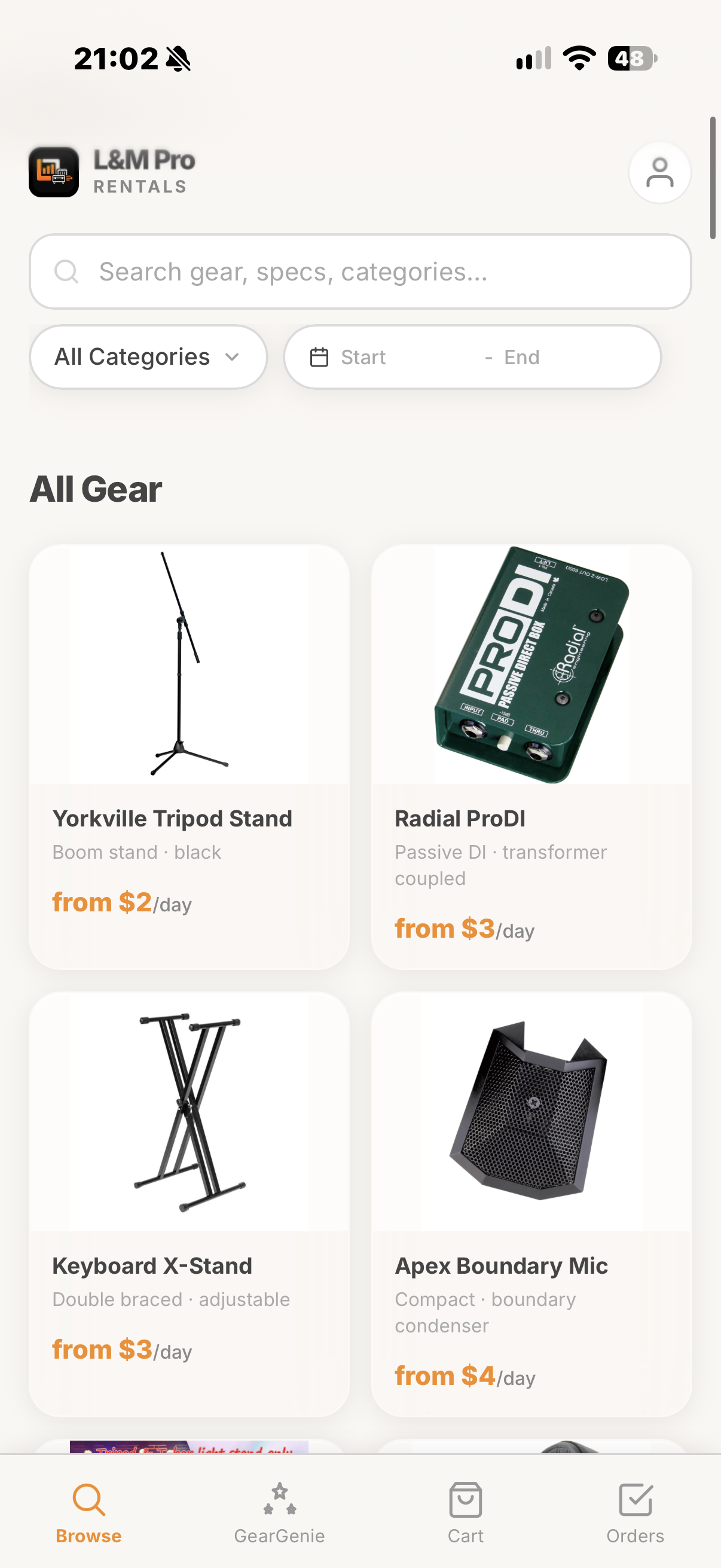
The first-time renter enters through Browse and Search - a guided category filter with date-range availability, pulling real L&M product data into a card grid. The event professional enters through GearGenie - a deterministic kit builder that takes event type, guest count, venue type, and dates, then returns a recommended gear list.
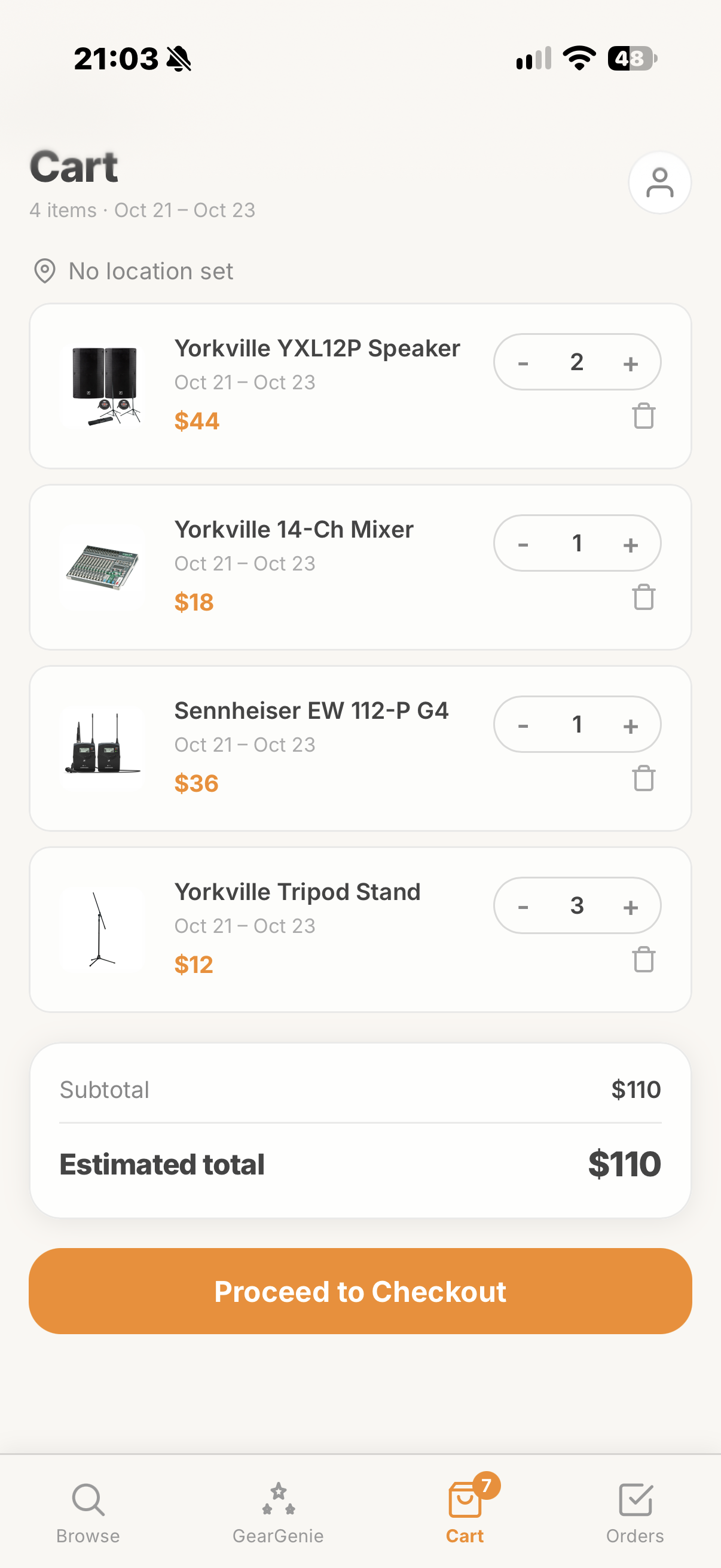
Both paths converge at the Cart, where the cross-location fulfillment resolver does the work nobody else has built - detecting when items in a single order span multiple branches and offering consolidation. From there, Checkout surfaces deposit terms and delivery options inline, and the flow fans out to Pickup and Return (mobile-first condition check-in) and Order History (repeat-kit reordering for pros).
Entry Paths
- Browse and Search: Category, date, and location filters for guided discovery
- GearGenie: Deterministic kit recommendation from event parameters
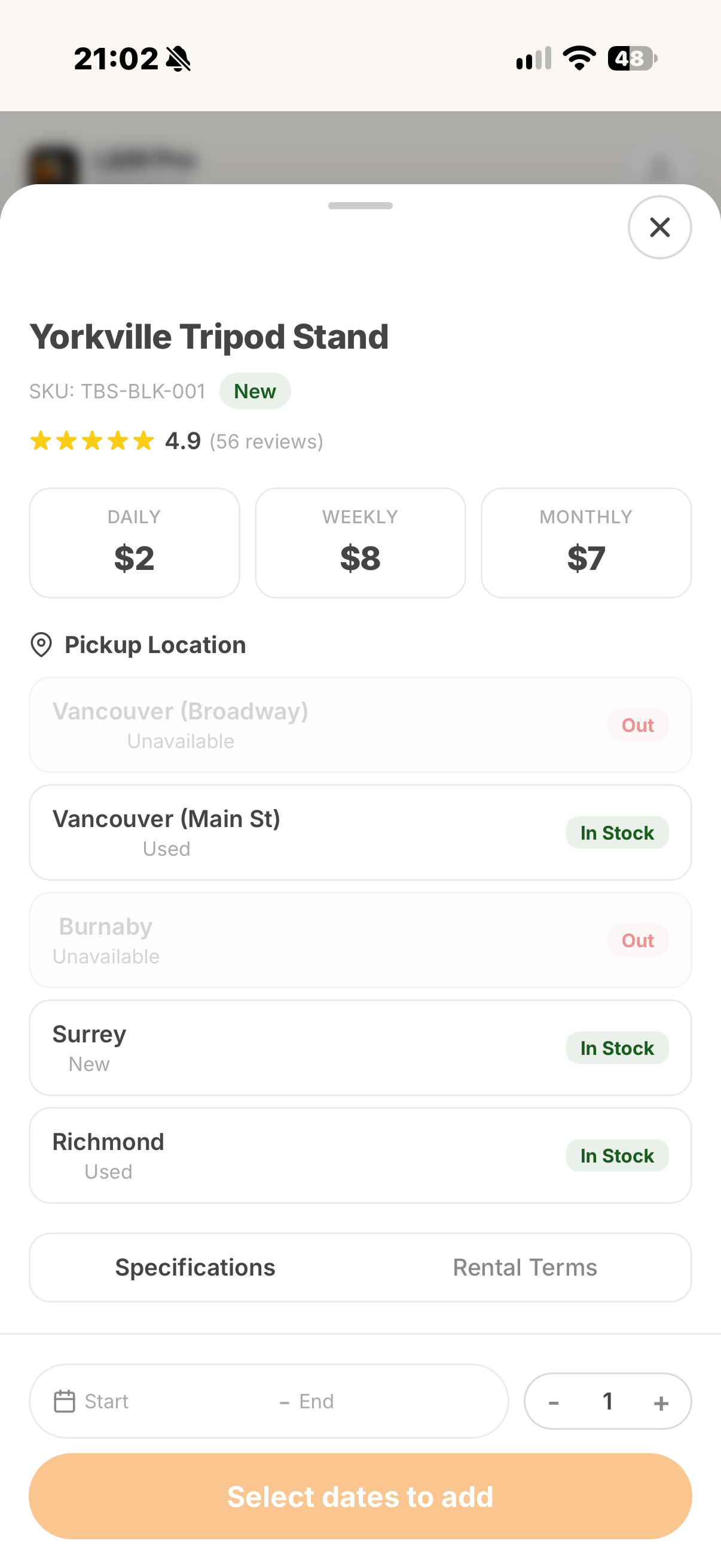
- Gear Detail: Drawer from either path - specs, pricing tiers, inline rental terms
Convergence
- Cart: Cross-location fulfillment detection and consolidation
- Checkout: Deposit terms, delivery vs. pickup per location, mocked payment
Post-Rental
- Pickup and Return: Mobile-first condition check-in with photo capture
- Order History: Past orders with one-tap kit reordering for repeat renters
GearGenie turns “I have a wedding for 150 guests next Saturday” into a priced, in-stock gear list - without a single phone call
The recommendation engine takes four inputs: event type, guest count, venue (indoor, outdoor, or mixed), and rental dates. It runs deterministic rule matching - not a black-box LLM - against two data layers: four named kit templates that L&M staff already quote manually (Standard PA, Panel/Conference, Recording/Hybrid Meeting, Presentation + Projector), and a heuristic rules table covering scenarios those templates do not (weddings, DJ sets, outdoor festivals).
When a request matches a named template closely, GearGenie returns it directly - fast and predictable. When it does not, the engine looks up target wattage, speaker counts, mic counts, and mixer channel minimums from the heuristic rules, then matches those specs against real in-stock items from L&M’s inventory to assemble a live gear list. Every recommendation links back to actual catalog data. Nothing is invented.
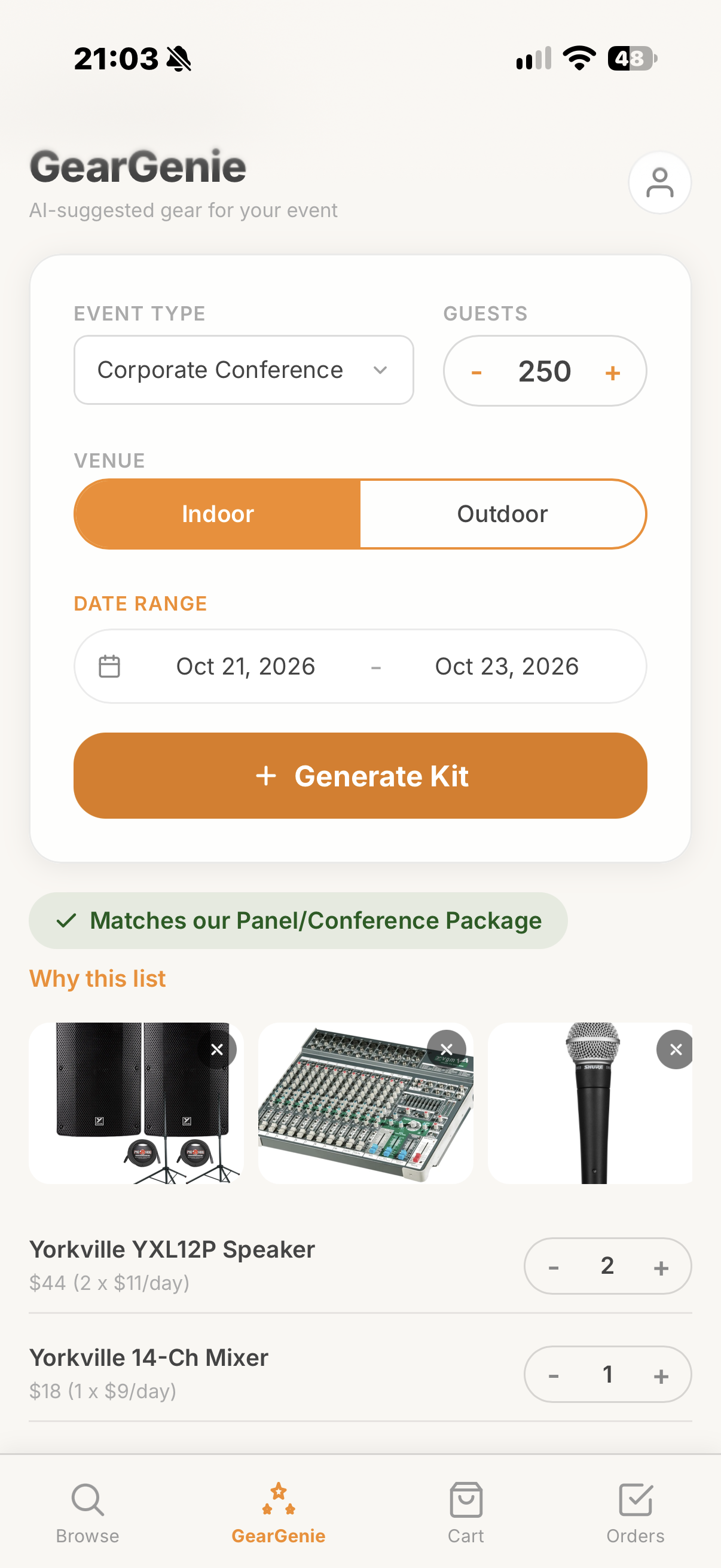
The engine communicates three distinct confidence levels - each with different visual treatment - so the user always knows how much inference went into their result
Most recommendation systems present every result with equal confidence. GearGenie does the opposite: the UI changes based on how the result was produced. A template match gets a green badge and a named package; a heuristic assembly gets a different label and a tier disclosure; a no-match gets an honest fallback. The user can always tell whether they are looking at a known combination or a computed suggestion.
Template Match
- Trigger: Event type maps directly to one of four named L&M packages (Standard PA, Panel/Conference, Recording/Hybrid, Presentation + Projector)
- UI signal: Green badge - “Matches our [Package Name]“
- Confidence: Highest - this is a pre-quoted combination that L&M staff already use
- Disclosure: “This matches our pre-built [name]. Items and quantities are based on real packages quoted by Long & McQuade for similar events.”
Heuristic Match
- Trigger: No template fits, but the heuristic rules table has a row for the event type, guest count, and venue
- UI signal: “Suggested based on your event size” with tier label
- Confidence: Medium - the engine assembled a custom list from target specs (watts/guest, speaker counts, mixer channels)
- Disclosure: Shows the underlying rule - e.g. “6-8W/guest, indoor, 300-400 guests. 2 speakers, 2 wireless + 3 wired mics, 8+ mixer channels.”
No Match
- Trigger: Parameters fall outside all sizing tiers (extreme guest count, Custom event type with no reasonable fallback)
- UI signal: Info icon - “No close match found”
- Confidence: N/A - graceful degradation rather than a forced bad recommendation
- Fallback: Suggests contacting a Long & McQuade location directly, echoing the real L&M flow this screen is otherwise improving on
The resolution logic runs in strict priority order: template match first, heuristic fallback second, no-match last. When a guest count falls between two heuristic tiers, the engine defaults to the nearer or larger tier and surfaces which tier it matched. When an item in the suggested list has no confirmed price, it displays “Price to be confirmed” on that line item rather than showing $0 or silently excluding it from the total. The design principle is the same throughout: if the system is uncertain, say so - do not paper over the gap.
The cart solves the problem nobody else in the competitive landscape has touched - what happens when your kit spans two branches
When a user adds items that are stocked at different L&M locations, the cart detects the split and surfaces it immediately: “Your kit will be split across 2 locations - Toronto (Bloor St.) and Toronto (Yorkdale) - you will need two pickups.” A Consolidate button lets the user attempt to source everything from one branch, subject to availability.
This is not an edge case. For an event pro renting a full PA setup, cross-branch fulfillment is the norm. The competitive teardown found that neither ShareGrid nor KitSplit has solved this because they are peer-to-peer - items come from different owners, not different branches of the same retailer. L&M’s multi-branch inventory is the asset; the cart is the feature that makes it usable.
Rental terms, deposit requirements, and pricing tiers are surfaced inline - not buried in a FAQ page disconnected from the product
On L&M’s current site, critical rental information - ID requirements, deposit amounts for cash payments, hold fees for advance reservations - lives on a separate FAQ page. A renter discovers these terms after they have already committed to the rental, not before. The redesign moves this information to two places where it belongs: the Gear Detail drawer (inline with the item the user is considering) and the Checkout screen (inline with the payment form).
Pricing is shown as day, week, and month tiers by default. When the user has already set a date range upstream in Browse or GearGenie, the detail drawer resolves to an actual total for that exact rental window instead of showing only generic rates.
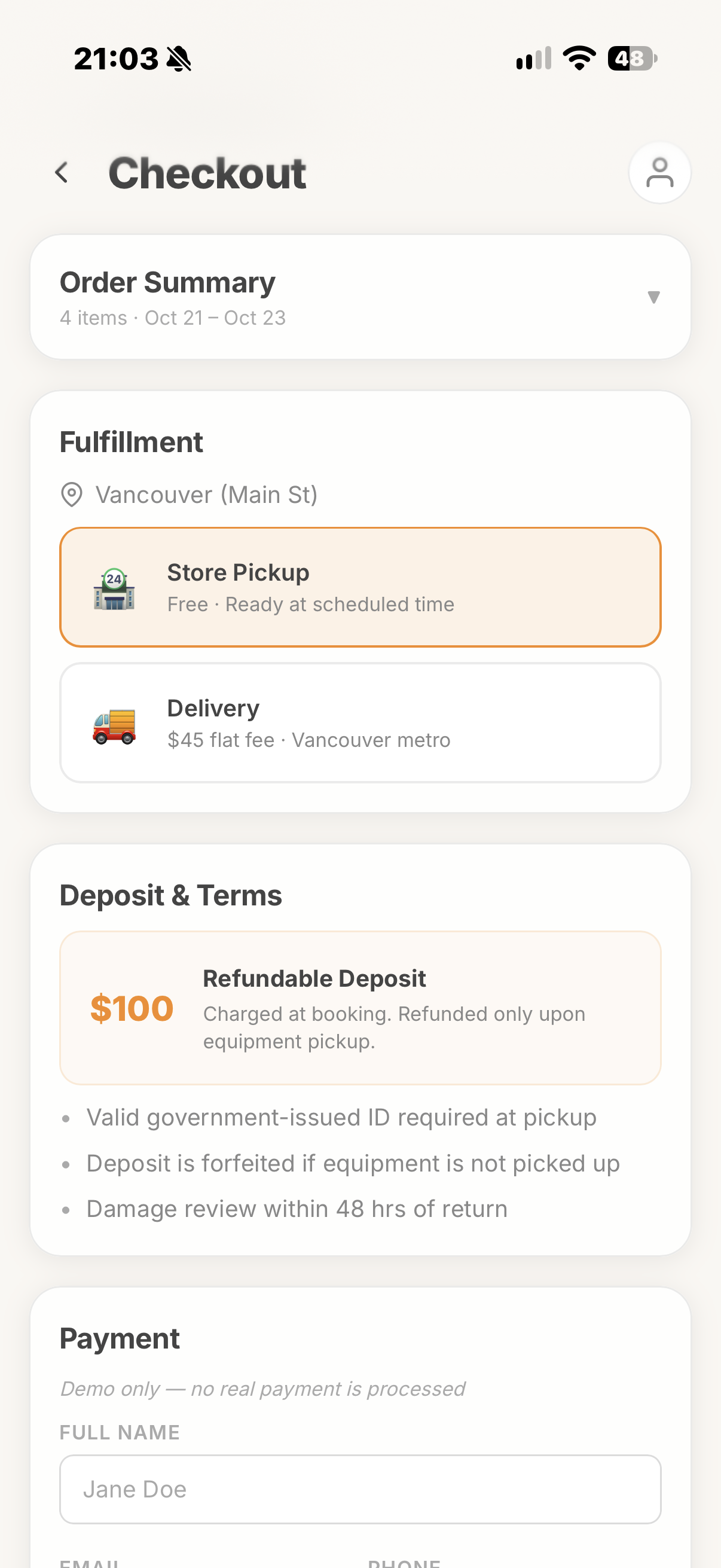
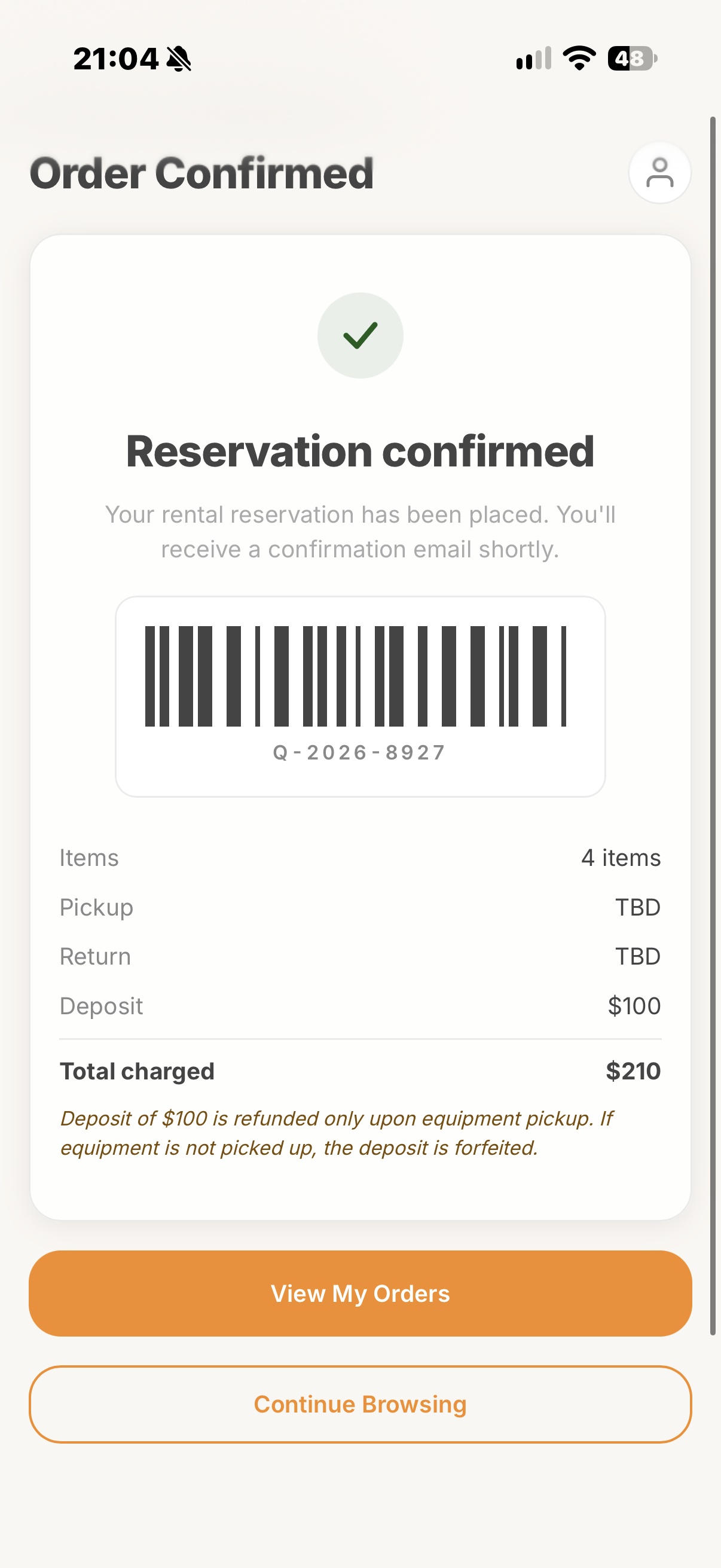
Every screen in the flow was built against four accessibility requirements - contrast, touch targets, focus states, and error handling
Contrast & Color
- WCAG AA compliance: All body text meets a minimum 4.5:1 contrast ratio against surface colors; large headings meet 3:1
- Dual-channel status: Availability indicators (In Stock / Out) and success/warning states use both color and iconography - never color alone
- Surface hierarchy: Raised cards, input fields, and interactive surfaces maintain contrast against the base background through border and shadow, not just fill color
Touch & Interaction
- 44px minimum targets: All buttons, steppers, toggle controls, and tappable rows maintain a 44x44px minimum touch target - including the quantity steppers in the cart and kit builder
- Visible focus states: Every interactive element carries a visible focus ring for keyboard and assistive-device navigation
- Inline error handling: Form validation errors surface immediately below the relevant field with a descriptive message - not in a disconnected toast or modal that requires context-switching
Four principles shaped every screen in the flow - from browse through post-rental
Pro-First, Newcomer-Safe
The event professional’s multi-item, multi-day workflow drives the architecture. The first-time renter gets a simpler path into the same system - not a dumbed-down version.
Real Data, No Fiction
Every price, every item, and every kit recommendation traces back to L&M’s actual catalog. GearGenie’s heuristic rules produce deterministic results - nothing is hallucinated.
Surface the Hidden
Rental terms, deposit rules, and cross-branch splits are shown at the point of decision, not after commitment. If the information affects the user’s choice, it belongs on the screen where they are choosing.
Solve the Unsexy Problem
Cross-location fulfillment is not glamorous, but it is the real pain point for anyone renting more than two items. The cart’s split-detection and consolidation logic is the feature the competitive landscape is missing.
The core bet held up - a single retailer’s multi-branch inventory is an asset, not a constraint, if the fulfillment logic is surfaced properly
GearGenie’s three trust states let the system be honest about how much inference went into a recommendation rather than presenting everything with equal confidence. The cross-location fulfillment resolver solves a real logistics gap that peer-to-peer competitors structurally cannot address - their items come from different owners, not different branches of the same retailer.
The decision to use deterministic rule matching over an LLM for the recommendation logic was validated in testing: users trusted the output more when they could see the underlying rule (“6-8W/guest, indoor, 300-400 guests”) than when they received an opaque “AI-generated” suggestion. The “Why this list” disclosure, initially designed as a pro-user feature, turned out to matter for first-time renters as well - it answered the question “can I trust this?” before it was asked.
What is next: the mobile-first Pickup and Return condition check-in flow (photo capture for pre/post-rental damage documentation), visual polish applying iOS’s Liquid Glass design language, expanded heuristic rules for outdoor events and festivals, and real-time inventory sync for live stock status.
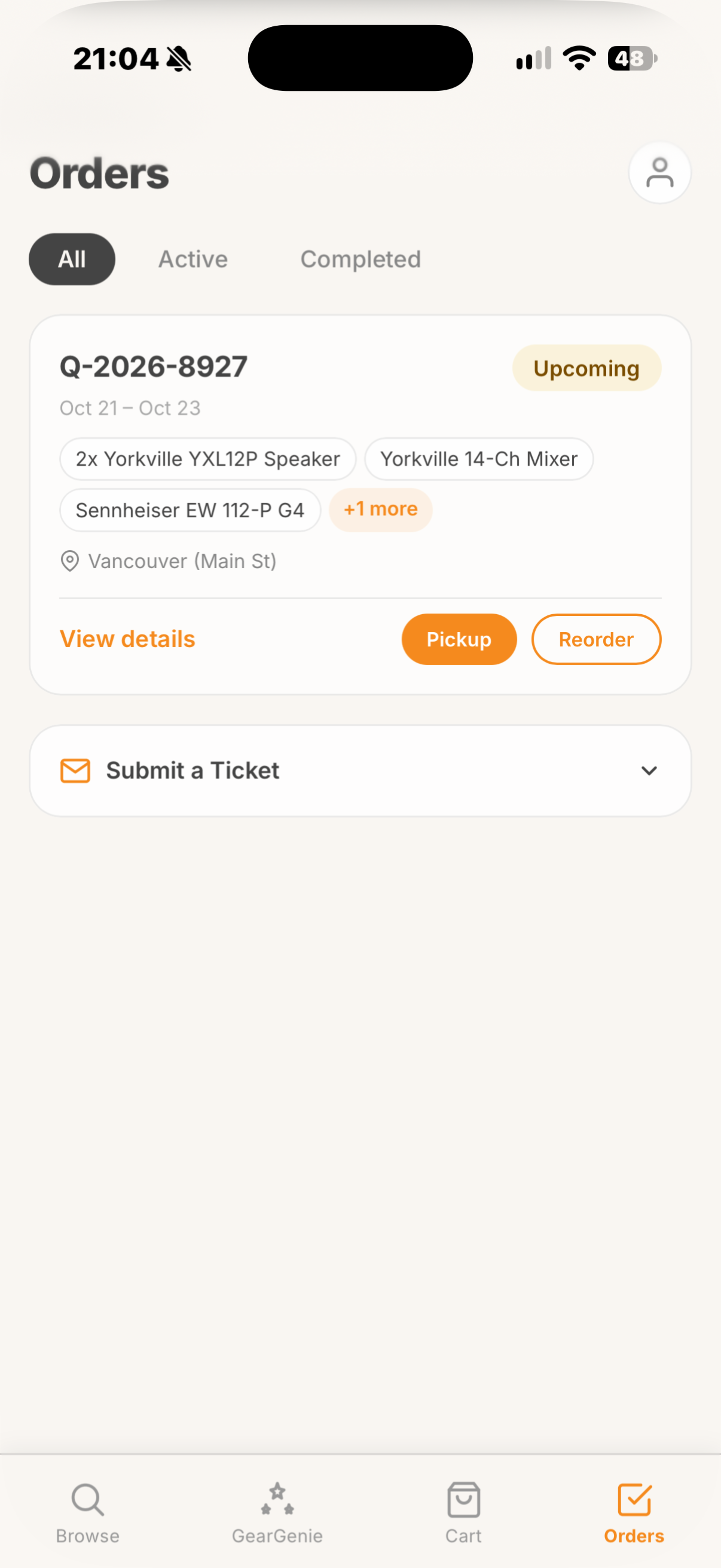
- Built a deterministic kit recommendation engine (GearGenie) with three explicit trust states - template match, heuristic assembly, and graceful no-match fallback - that communicates confidence level to the user at every step.
- Designed and shipped a cross-location fulfillment resolver that detects multi-branch cart splits and offers one-tap consolidation - a problem no competitor in the Canadian pro-audio rental space has solved.
- Moved rental terms, deposit requirements, and pricing tiers from a buried FAQ page to inline placement at the point of decision - Gear Detail and Checkout.
- Maintained WCAG AA contrast ratios, 44px minimum touch targets, visible focus states, and inline error messaging throughout the flow.